Excel

Power Automate ile Web İçin Excel’de Üretkenliğinizi Artırın!

Power Automate ile işinizi otomatikleştirin Web için Excel’de Power Automate tarafından desteklenen, görevleri otomatikleştirmeyi ve süreçleri her yerden verimli bir şekilde çalıştırmayı…

26 Eki 2023 Murat Osma 1 görüntüleme
Power Automate ile Web İçin Excel’de Üretkenliğinizi Artırın!

Power Automate ile işinizi otomatikleştirin

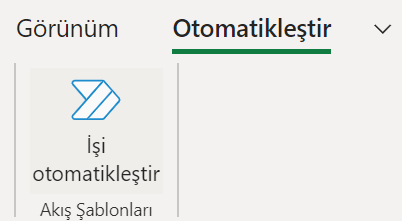
Web için Excel’de Power Automate tarafından desteklenen, görevleri otomatikleştirmeyi ve süreçleri her yerden verimli bir şekilde çalıştırmayı kolaylaştıran yeni “İşi Otomatikleştir” düğmesi eklendi. “İşi Otomatikleştir” düğmesi, “Bir Görevi Otomatikleştir” düğmesinin yerini alarak, önceden oluşturulmuş şablonlara erişim sağlayarak ve kullanıcıların web için Excel içinde hızlı ve kolay bir şekilde iş akışları oluşturmasına olanak tanıyarak Power Automate özelliklerini web için Excel’e genişletiyor.


Başlamak çok kolay!

Örneğin, “Excel çalışma sayfasında bir takma ada gelen e-postaları izleyin” şablonunu kullanarak müşteri geri bildirimlerini e-postalardan otomatik olarak yakalayabilir ve bir Web için Excel çalışma sayfasında saklayabilirsiniz. Bu şablon sayesinde işletmeler müşteri geri bildirimlerini tek bir merkezi konumda takip edebilir, böylece müşteri ihtiyaçlarına yanıt vermek ve müşteri memnuniyetini artırmak kolaylaşır.

Excel Masaüstü Flow Eklentisi

Aslında bir süredir masaüstünde de Flow eklentisi ile mevcut sayfada seçili satırları OneDrive‘daki bir Excel‘e kaydedebileceğimiz gibi senaryoları zaten kullanabiliyorduk. Şimdi ise, Otomatikleştir menüsü altında İşi Otomatikleştir özelliği getirilecek işin kapsamı daha da genişletilecek.


Kullanılabilirlik:

Yeni “İşi Otomatikleştir” düğmesi şu anda Microsoft 365 ofis masaüstü uygulamalarına (örneğin Office 365 E3 ve E5 lisansları) erişim sağlayan ticari veya EDU lisansına sahip kullanıcılarda web için Excel’de mevcuttur ve bunun Windows masaüstüne gelmesini dört gözle bekliyoruz.

Not: Web için Excel’de Otomatikleştir sekmesi yoksa yöneticinizin bu özelliği devre dışı bırakmış olabileceğini unutmayın.


Daha fazlası için eğitim ve danışmanlıklarımız hakkında bizimle iletişime geçebilirsiniz.

 

Paylaş: LinkedIn X WhatsApp

Bu kategoriden diğer yazılar

Excel

Boost Your Productivity in Excel for the Web with Power Automate!

Automate your business with Power Automate Powered by Power Automate in Excel for the web, it's easy to automate tasks and run processes efficiently from anywhere.

Oct 26, 2023 Murat Osma 1 views
Boost Your Productivity in Excel for the Web with Power Automate!

Automate your business with Power Automate

Added new "Automate Work" button powered by Power Automate in Excel for the web, making it easier to automate tasks and run processes efficiently from anywhere. The "Automate Work" button replaces the "Automate a Task" button, extending Power Automate capabilities to Excel for the web by providing access to pre-built templates and allowing users to quickly and easily create workflows within Excel for the web.


It's easy to get started!

For example, you can use the "Track emails to an alias in an Excel worksheet" template to automatically capture customer feedback from emails and store it in an Excel for the web worksheet. With this template, businesses can track customer feedback in one centralized location, making it easier to respond to customer needs and improve customer satisfaction.

Excel Desktop Flow Add-in

In fact, for a while, we have already been able to use scenarios such as saving selected rows on the current page to an Excel in OneDrive with the Flow add-in on the desktop. Now, the Automate Work feature will be introduced under the Automate menu, and the scope of the work will be further expanded.


Availability:

The new "Automate Work" button is currently available in Excel for the web on users with a commercial or EDU license that provides access to Microsoft 365 office desktop apps (e.g. Office 365 E3 and E5 licenses), and we look forward to this coming to the Windows desktop.

Note: Note that if Excel for the web doesn't have the Automate tab, your administrator may have disabled this feature.


For more, you can contact us about our training and consultancy.


Related posts